gContactSync
What is gContactSync?
gContactSync is an extension that synchronizes contacts between Google (Gmail)
and an Address Book in Thunderbird. The current version is 0.2.11.
You can synchronize multiple accounts with multiple address books, and it
fully supports regular and hosted Google Accounts.
Which applications does it support?
gContactSync supports Thunderbird 2 and 3, Shredder 3.1 pre-releases and 3.2a1pre, and Seamonkey 2.
It works in Icedove
as well.
Where can I download it? How do I use it?
You can download it here
What attributes can it sync?
By default, it synchronizes the first four e-mail addresses, the first
screenname and number of each type in Google and every attribute in
Thunderbird except for Custom 3 and Custom 4.
It adds several fields to Thunderbird for e-mail addresses, screennames,
and numbers. Anything that is not synchronized is preserved.
Thunderbird has 6 address fields (two lines, the city, state, zip code, and country) for the home address and another 6 for the work address while Google only has one, which makes synchronizing addresses difficult. To solve this, gContactSync adds three new multi-lined fields to synchronize directly with the first home, other, and work addresses in Google. When a contact from Thunderbird is added to Google the new fields are filled from the old if they are empty. The new addresses, if present, replace the old ones when viewing a contact.
See the bottom of this page for a table of attributes.
Preferences
It is easy to change how gContactSync works and looks. You can read about the preferences here.
Screenshots
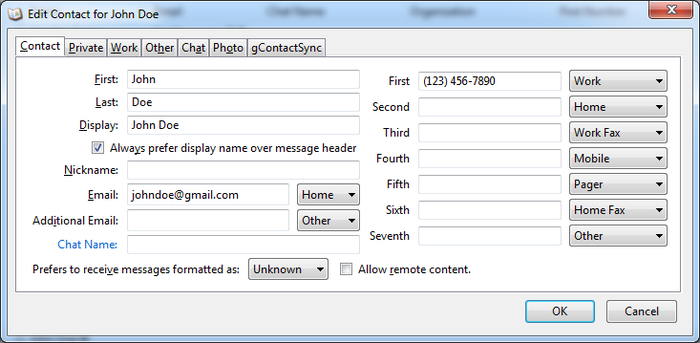
More screenshots are available here. The added attributes in the Edit Card Dialog:

Click here for a large screenshot of all of the possible attributes that are synced.
Synchronized Attributes
Google* |
Thunderbird |
| Name | Display Name |
| The first two Email Addresses | Primary and Second(ary) Email Addresses |
| The next 2 email addresses | Third and Fourth Addresses |
| Home, Work, and Mobile Numbers | Home Phone, Work Phone, Cellular Number |
| Work Fax number | Fax Number |
| Home Fax number | Home Fax Number** |
| Other number | Other Number** |
| AIM Screenname | Screenname |
| The first six screennames: Google Talk, MSN, ICQ, Yahoo, and Jabber screennames | Google Talk, MSN, ICQ, Yahoo, and Jabber Screenname** |
| Title | Job Title |
| Company | Company |
| Notes | Notes |
| Home and Work Address | Home and Work Address*** |
| Other Address | Other Address (multiple lines allowed)** |
*Only the first (primary) attribute of each type is synced from Google unless otherwise noted. The others are preserved while updating a contact.
**The attributes marked with ** are not standard and are added by this extension to the Address Book.
Up to 10 extra attributes from Thunderbird are synchronized . The default list includes: WebPage1, WebPage2, Department, FirstName, LastName, NickName, PreferMailFormat, AllowRemoteContent, Custom1, and Custom2.
All local data that is not synchronized (for example, extra e-mail addresses in a Google Contact) is preserved.